
Five Years of Eter: Meet Version 3.0
Five years ago, the first version of Eter appeared in the App Store. Krystian built it to do one thing well: be a clean, no-nonsense internet radio receiver for Apple devices. A lot has changed since then — Shazam recognition, listening history, import and export of favorites, broader platform support — but that one thing has stayed exactly the same. Eter is still an internet radio, and that’s still what it does best.
With version 3.0, we’re bringing the biggest visual and structural update yet to all three Apple platforms: Apple TV, iPhone and iPad, and Mac.
A grid view for your stations
Until now, Eter showed your stations as a list. That was fine when you had a handful of favorites, but once a collection grew it meant a lot of scrolling. On the Mac it was also a strange use of screen space — the list lived in the sidebar, while most of the window was taken up by artwork.
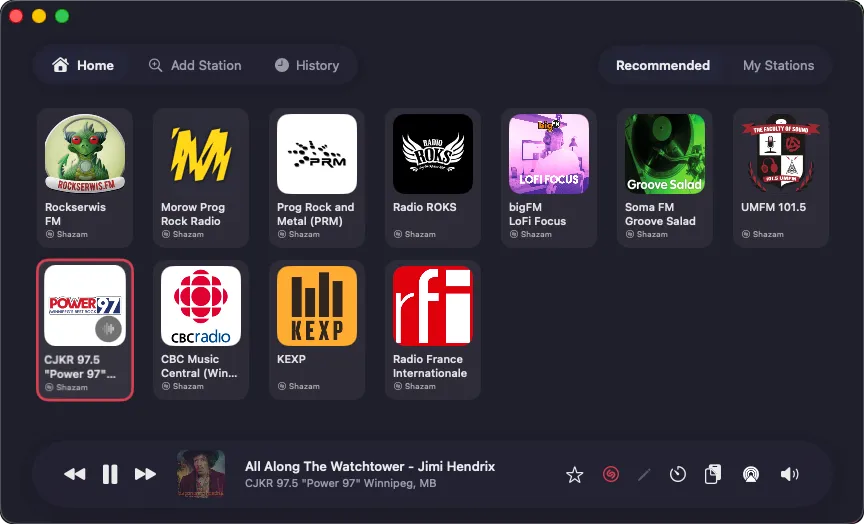
In Eter 3.0, stations appear as a grid of tiles on Mac, iPhone, iPad, and Apple TV. More stations on screen, fewer scrolls to find the one you want, and the artwork still gets to shine while something is playing.
A new look for Eter on Mac
The Mac app has been redesigned around the grid. Station tiles now fill the main window, with the player along the bottom holding everything you’d expect: play and pause, next and previous station, favorite, Shazam toggle, station editing, sleep timer, volume, and AirPlay.
The player also shows the station logo or, when Shazam recognizes a track, its album artwork. Tap the track title for an enlarged cover preview, or tap the cover itself to open the track in Apple Music or Spotify.
Three buttons at the top of the window switch between the grid, the Add Station view (which includes search), and your history of played tracks.
The MiniPlayer in the menu bar keeps the list view — it’s the right shape for a narrow popover — but its look has been refreshed to fit the Liquid Glass interface in macOS Tahoe.
Eter for Apple TV grew up
For a long time, the Apple TV version of Eter played a supporting role: it gave you the team’s recommended stations and the favorites you’d synced from your iPhone or Mac via iCloud, and that was about it.
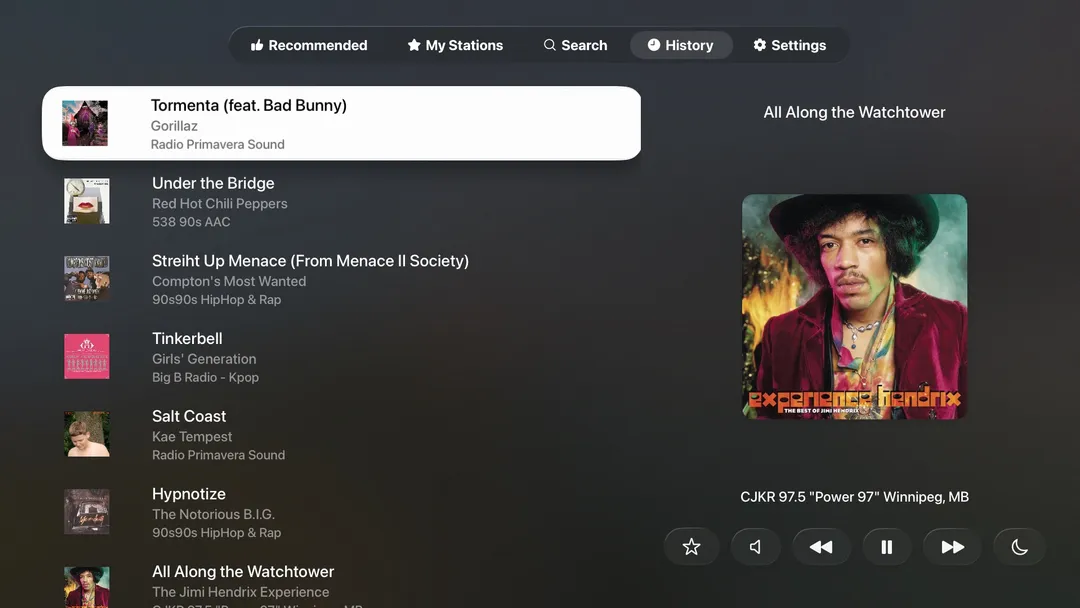
Eter 3.0 for tvOS does a lot more. You can now:
- Search and add stations directly on Apple TV.
- Browse your full history of played tracks.
- Set a sleep timer.
- Add Eter to the Top Shelf so you can jump straight into listening as soon as you open Apple TV.
A few platform limitations still apply — there’s no Shazam recognition or manual station entry on tvOS — but the app is now genuinely usable on its own, not just as a companion. Like the iPhone and Mac versions, the full experience is unlocked with a one-time purchase.
Eter for Android, almost ready
Over the years, plenty of you asked — sometimes in App Store reviews, sometimes by email — whether Eter would ever come to Android. We’ve been quietly working on it, and the answer is yes, very soon. Eter for Android is in final beta testing now.
The Android version has the same features as the iPhone version. A few practical notes:
- It’s a separate purchase. Different store, different platform.
- iCloud sync isn’t possible across operating systems, so syncing on Android is handled through Firebase and a separate sign-in inside the app.
- For now, you can move favorites between platforms by exporting from Eter on iOS or Mac and importing on Android. Full cross-platform sync is on our list.
What’s next
After five years, Eter is still one of the more popular radio apps on iOS and macOS, and we’re not slowing down. There’s more on the way.
We’re also genuinely interested in what you think — feature ideas, bugs, things that don’t quite feel right. The Eter Discourse forum is the best place for all of that. Do you think you might have found a bug that needs squishing? Email us at support@apparentsoft.com
Ready to explore the world of Internet Radio? Available on all Apple devices including CarPlay, immerse yourself in seamless radio streaming with Eter.For more information and to discover all that Eter has to offer, visit ourwebsite.